
 ChatGPT
 Perplexity
 Gemini
 Claude
Summary
MiniMax H3 Image unifies text-to-image generation and instruction-driven editing in one checkpoint, supporting native 16MP (up to 4K) output in 6 distilled steps and up to 16 reference images.
Follow this practical prompting guide using natural language and <Picture N> reference tags, or pair cloud 4K still generation with MiniMax H3 Image-to-Video for 2K motion workflows.
MiniMax H3 Image (MiniMax-H3-Image) has quickly become one of the most talked-about open-weights image architectures for designers, e-commerce teams, and ComfyUI builders—and for good reason. Instead of splitting generation and editing across separate checkpoints or relying on slow multi-stage upscalers, MiniMax H3 Image handles text-to-image synthesis, instruction editing, and up to 16-image reference composition inside a single unified model, outputting up to 16 megapixels (4K) in 6 distilled steps.
Alongside the base release, Pruna AI’s distilled P-H3-Image variant pushed adoption across Reddit (r/comfyui) and Hugging Face even further by trimming inference overhead for faster photorealistic and editorial generation.
In this MiniMax H3 Image guide, you will learn how the architecture works under the hood, how to write high-precision <Picture N> multi-reference prompts, five ready-to-copy templates for real commercial work, and how to move smoothly from 4K still frames to synchronized 2K motion workflows on Banana AI.
What Is MiniMax H3 Image (and P-H3-Image)?
MiniMax-H3-Image is a few-step diffusion transformer (DiT) developed by MiniMax. Unlike older open-weights pipelines that require separate ControlNet adapters, IP-Adapter hacks, or 2x/4x hires-fix passes to reach print or storefront resolution, H3 Image natively models fine textures, crisp multilingual typography, and multi-subject identity inside one graph.
Shortly after the core weights (MiniMaxAI/MiniMax-H3-Image) landed on Hugging Face, Pruna AI released P-H3-Image, an optimized 8-step, no-CFG distillation tailored for lighter VRAM footprints and punchier editorial lighting.
| Dimension | MiniMax-H3-Image (Official) | P-H3-Image (Pruna Distilled) | Banana AI Cloud Studio |
|---|---|---|---|
| Primary Role | Open-weights T2I + multi-ref editing | Faster, lighter distilled H3 image variant | Browser-based multi-model image & video creation |
| Sampling Steps | 6 NFEs (< 10s at 4K on high-end GPU) | 8 distilled steps, no-CFG | Zero local setup; instant cloud queue |
| Max Native Output | ~16 MP (4096 x 4096, wide 6272 x 2688) | High-res photoreal & editorial outputs | 1K / 2K / 4K depending on selected image engine |
| Reference Inputs | Up to 16 simultaneous reference images | Multi-reference subject & style editing | Multi-reference support across Nano Banana 2.1, Seedream 5.0 Pro & more |
| Hardware Needed | High VRAM GPU (local ComfyUI 0.42+) | Reduced VRAM vs base, still needs local GPU | Any browser (desktop or mobile) |
| Best Next Step | Export PNG or feed into video workflow | Rapid local portrait & editorial batching | Direct Image-to-Video animation via MiniMax H3 |
Important regional & licensing note: MiniMax’s open-weights release includes specific commercial and geographic compliance terms (initially targeting evaluated regions such as the US, EU, UK, and South Korea). Always review the upstream model card before deploying local weights at commercial scale.
How the Unified Single-Checkpoint Architecture Works
Traditional ComfyUI workflows often feel fragile because switching from “generate from scratch” to “keep the model’s face and swap the jacket” means rewiring loaders, LoRAs, and strength sliders. MiniMax H3 Image eliminates that split.
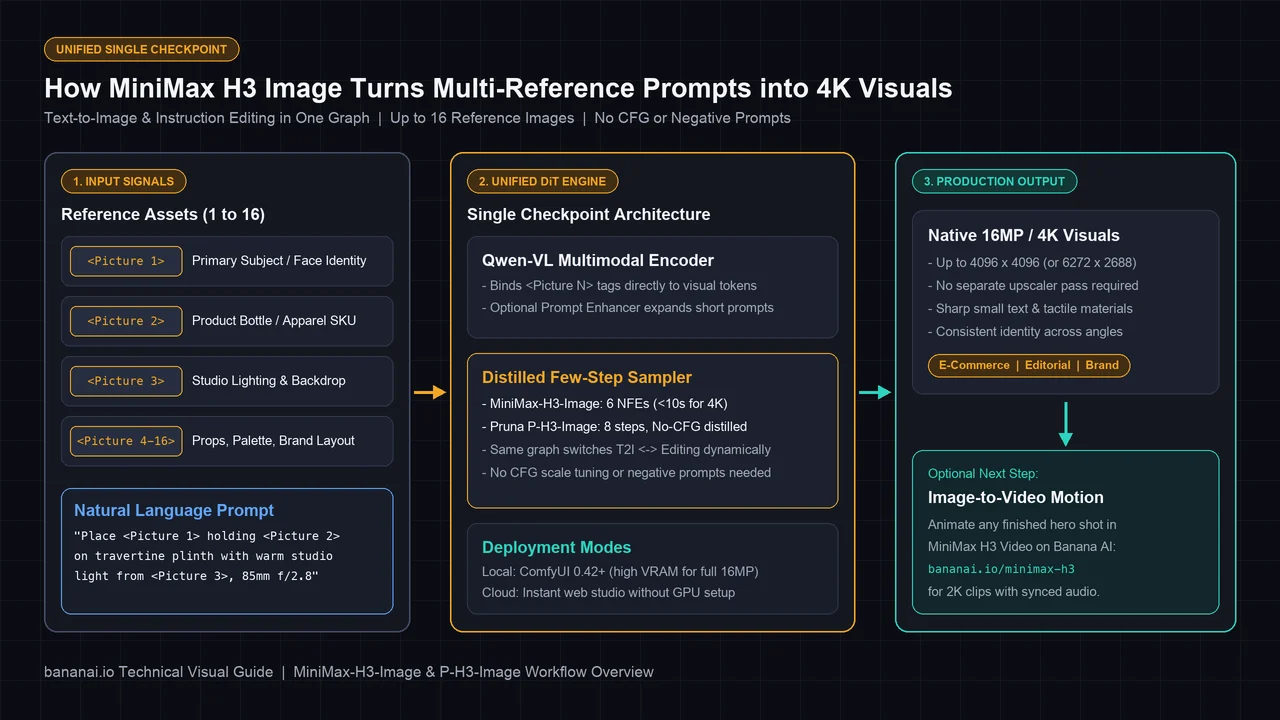
Three architectural choices define how you should prompt and run it:
- Qwen-VL Multimodal Conditioning: Instead of relying on keyword tags, the model uses a vision-language backbone closely aligned with Qwen-VL. It reads full sentences, spatial relationships (“behind the frosted glass bottle, slightly off-center”), and material cues with literal precision.
- One Graph for Generation and Editing: When zero images are connected, the workflow behaves as pure text-to-image. As soon as you attach one or more reference frames, the exact same checkpoint shifts dynamically into instruction-guided editing and reference fusion.
- No CFG Scale and No Negative Prompts: Because both MiniMax-H3-Image and P-H3-Image are few-step distilled models, classical Classifier-Free Guidance (CFG) scaling and negative prompt boxes have no effect (or break output fidelity). Everything you want excluded must be phrased positively—for example,
"clean matte stone background with zero clutter"rather than putting"clutter, ugly, blurry"into a negative field.
Mastering Multi-Reference Prompts with Picture N Syntax
The signature superpower of MiniMax H3 Image is 16-reference conditioning. Whether you are shooting a seasonal e-commerce campaign or building a consistent brand mascot, every image slot you wire into the workflow is addressed explicitly in text using <Picture 1>, <Picture 2>, <Picture 3>, and so on.
Rules That Keep Multi-Reference Shots Accurate
- Assign one clear role per reference slot. Keep
<Picture 1>as your primary identity or hero product,<Picture 2>as wardrobe or secondary object, and<Picture 3>as lighting or environment mood. Mixing two competing faces or two full scenes without explaining which element to borrow from each confuses spatial binding. - State the action and contact physics explicitly. Don’t just write
"<Picture 1> and <Picture 2> together."Specify how they interact:"The woman from <Picture 1> holds the matte sage dropper bottle from <Picture 2> at chest height with relaxed fingers, keeping the original label orientation facing the camera." - Describe lighting consistency across imported assets. When compositing a cutout product into a sunlit scene, add directional light cues (
"warm late-afternoon sunlight casting diagonal window-blind shadows across the travertine pedestal and the frosted glass surface") so the model relights the asset naturally instead of pasting it flatly. - Use the Prompt Enhancer sparingly on strict layouts. MiniMax provides an optional Prompt Enhancer node that expands brief prompts into rich photographic descriptions. It works wonders for open-ended scenes, while exact e-commerce compositions benefit from keeping your own explicit
<Picture N>constraints intact.
Prompt Comparison: Weak Tag Soup vs. H3-Ready Instruction
❌ Avoid (Legacy SDXL / Negative-Prompt Habits):
product photo, serum bottle, best quality, 8k, masterpiece, photorealistic
Negative prompt: blurry, deformed hands, watermark, messy background

✅ Use Instead (Natural-Language Instruction for MiniMax H3 Image):
Commercial studio photograph of the frosted sage-green glass dropper bottle from <Picture 1> centered on a raw carved travertine stone slab. Fine water condensation droplets cling to the glass. Soft warm morning sunlight streams through horizontal wooden blinds on the right, casting crisp diagonal shadows and delicate eucalyptus leaf silhouettes across a textured plaster wall. Shot on an 85mm medium-format lens at f/2.8 with natural color grading and an unobstructed neutral foreground.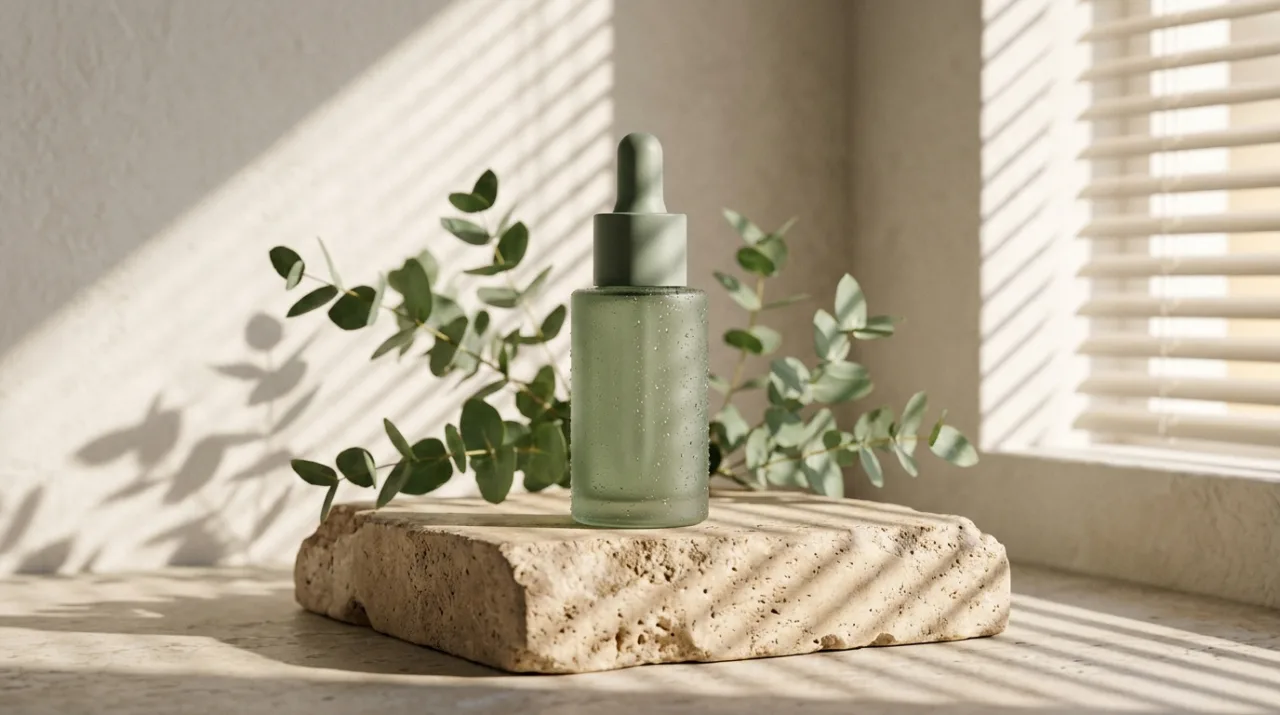
Notice how specifying lens focal length (85mm f/2.8), surface material (raw carved travertine, frosted glass condensation), and light geometry (diagonal shadows from wooden blinds on the right) produces crisp commercial depth without needing quality buzzwords.
5 Copy-Paste MiniMax H3 Image Prompts for Production Work
Use these templates directly in ComfyUI (<Picture N> slots) or adapt the descriptive structure inside any cloud generator on Banana AI.
1. E-Commerce Hero Product Shot (4K Micro-Texture)
Ultra-crisp 4K commercial product photograph of <Picture 1> resting on a sculpted matte limestone block. Soft diffused daylight from a large side softbox creates clean specular highlights along the packaging edges, while a subtle rim light separates the silhouette from a warm sand-toned seamless backdrop. Sharp focus across the entire label typography, natural contact shadow beneath the base, editorial minimalist aesthetic.2. Multi-Reference Lifestyle Campaign (Model + SKU + Scene)
Candid editorial lifestyle photograph combining the person from <Picture 1>, the tailored terracotta linen blazer from <Picture 2>, and the sunlit brutalist courtyard setting from <Picture 3>. The subject stands naturally in three-quarter profile, wearing the blazer from <Picture 2> and holding the ceramic bottle from <Picture 4> in her right hand. Golden-hour sunlight wraps softly around her hair and fabric weave, preserving exact facial identity and product shape. Shot on 50mm f/2.0, authentic skin texture, filmic dynamic range.3. Consistent Character Turnaround for Storyboards
Clean studio character reference sheet showing the exact character from <Picture 1> in three side-by-side full-body views on a neutral mid-gray background: front view, three-quarter side profile, and back view. Maintain identical facial structure, hairstyle, jacket stitching, footwear, and color palette across all three poses. Even flat studio lighting with soft ground contact shadows and balanced spacing between poses.4. Editorial Portrait with Crisp Fabric & Skin Detail
Close-up medium-format editorial portrait of a creative director sitting beside a tall rain-streaked café window at dusk. Soft cool ambient window light mixes with warm tungsten interior bounce on the cheek. Fine natural skin pores, stray eyebrow hairs, crisp cashmere sweater knit texture, shallow depth of field with bokeh street lights behind the glass, 85mm f/1.8 lens look.5. Clean Typography Poster & Packaging Layout
Minimalist architectural exhibition poster design featuring a monolithic brushed-aluminum sculpture centered against a deep charcoal matte background. At the top margin, clean Swiss-grotesque sans-serif typography reads "FORM & LIGHT" in crisp off-white lettering, balanced by smaller aligned caption text "NOVEMBER EDITION" along the lower-left grid line. Razor-sharp letter edges, balanced whitespace, print-ready graphic layout.Local ComfyUI Setup vs. Zero-GPU Cloud Workflows on Banana AI
Running MiniMax H3 Image locally gives open-weights tinkerers full node control, though full 16MP native generation comes with serious VRAM demands. Keeping a few practical rules in mind prevents wasted time:
- Update to ComfyUI
0.42.0+: Older builds lack native template wiring forMiniMax-H3-ImageandP-H3-Image. Load the starter graph directly from Template → MiniMax-H3-Image (or the Pruna P-H3-Image template) rather than guessing node links from scratch. - Draft on a ~4MP canvas first: ComfyUI’s official templates intentionally default below full 16MP so consumer cards don’t immediately hit out-of-memory errors. Lock your prompt and
<Picture N>composition at 2K/4MP first, then scale resolution only for final hero renders. - Need results right now without configuring weights or renting a 24GB+ GPU? Open the Banana AI Image Generator directly in your browser. In one unified studio, you can pick the exact specialist engine that matches your task:
- Use Nano Banana 2 for fast 4K concept exploration and real-world knowledge grounding, or Nano Banana 2.1 when you need sharp multi-image reference editing.
- Switch to GPT Image 2.5 when precision typography and commercial poster layouts matter most.
- Try Seedream 5.0 Pro for layered commercial graphics or Qwen Image 3.0 for dense multilingual text and clean structural layouts.
Turning 4K Stills into Cinematic Motion with MiniMax H3 Video
One of the highest-ROI production habits for e-commerce brands and social creators is separating visual lock from motion synthesis. Generating video purely from a text prompt often causes logos, product silhouettes, or faces to drift between frames. Starting from a locked, high-resolution still image removes 80% of that randomness.
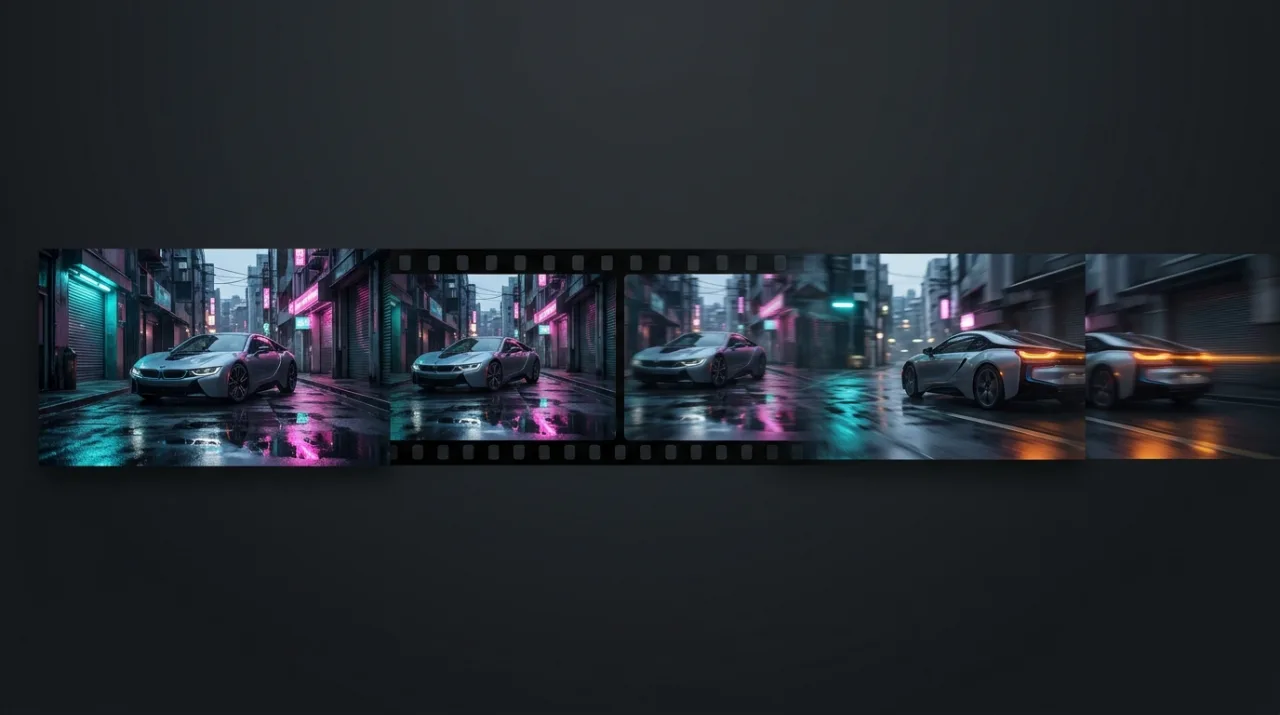
Here is the two-step cloud workflow inside Banana AI:
- Lock the hero frame first: Build and refine your key visual in Banana AI’s image studio (for example, using Nano Banana 2.1 or Seedream 5.0 Pro) until lighting, label details, and subject identity are spotless.
- Animate with MiniMax H3 Video: Send that finished frame straight into the MiniMax H3 AI Video Generator using Image-to-Video or Reference-to-Video mode. MiniMax H3 renders 4 to 15 second 2K video clips with synchronized native sound, letting you add slow dolly pushes, fabric breeze, or neon street reflections while keeping your hero product grounded—or compare motion across models like Wan 3.0 and Seedance 2.5 inside the same workspace.
Troubleshooting Common MiniMax H3 Image Issues
- My negative prompt is being ignored: Expected behavior. Remove negative prompt text and rewrite the positive prompt to specify clean surfaces, empty backgrounds, and exact framing.
- ComfyUI crashes with CUDA Out of Memory (OOM): Lower the canvas to ~2048×2048 (4MP) while iterating, verify that text encoder weights are offloaded cleanly, or test Pruna’s 8-step P-H3-Image pipeline to trim memory overhead.
- Reference objects merge or warp: Limit active slots to the 2–4 references you actually mention in text, and ensure every
<Picture N>index in your prompt matches the exact wire order in your graph. - Outputs look generic or under-detailed: Replace 5-word requests with concrete camera, material, and light-direction phrasing—or enable the Prompt Enhancer on early concept drafts before locking your layout.
Frequently Asked Questions
What is the difference between MiniMax H3 Image and P-H3-Image?
MiniMax-H3-Image is MiniMax’s official open-weights DiT checkpoint distilled to 6 steps for native 16MP (4K) synthesis and 16-reference editing. P-H3-Image is Pruna AI’s 8-step, no-CFG distilled variant tuned for faster inference and lower VRAM overhead on local hardware.
Does MiniMax H3 Image use negative prompts or CFG scale?
No. Both models are few-step distilled architectures guided by a multimodal Qwen-VL encoder. Traditional CFG scaling and negative prompt boxes are bypassed—always write clear, positive natural-language descriptions.
How many reference images can MiniMax H3 Image handle at once?
It supports up to 16 simultaneous reference images, bound sequentially in your prompt using <Picture 1>, <Picture 2>, and so on.
What hardware or ComfyUI version do I need locally?
You need ComfyUI 0.42.0 or newer with the official starter templates and a high-VRAM GPU (roughly 24GB+ VRAM for smooth iteration, drafting around 4MP before stepping up to 16MP). If you prefer zero local setup, you can create 4K stills online in Banana AI Image Generator.
Can I animate generated images with MiniMax H3 on Banana AI?
Yes. After finalizing any high-resolution still image, switch to MiniMax H3’s Image-to-Video mode on Banana AI to animate 4–15 second 2K videos with synchronized audio from your still frame.